AI Notes
Updated Thu 2025-05-01 | 1459 words
- 2025-05-01 VS Code Agent Mode
- Fri 2025-05-16 Coercing Copilot
- Tue 2025-07-01 Project prompts
- Thu 2026-01-01 - Trying VS Code here again
- Sun 2026-02-22 VS Code update notes
- Sat 2026-03-07 VS Code update notes
I want to keep some scattered AI notes here...
2025-05-01 VS Code Agent Mode
VS Code Agent Mode Just Changed Everything - YouTube
Use agent mode in the chat
Use #fetch and ask it to follow instructions
Hit keep all when it does stuff
8m - .github/copilot-instructions.md for custom copilot instructions + project requirements
10m - MCP server to talk to Postgres
13m30s - edit suggestions
burkeholland.github.io
My turn
Made vscode-agent-01
Asked it to create the project; it had trouble installing Go dependencies, so I did that and told it to continue.
It wrote some stuff and I had it generate a test and that was wrong
It seems to get stuck if a command fails, like installing dependencies and fixing test errors.
But I'm still able to fix things manually and tell it to keep going
Fri 2025-05-16 Coercing Copilot
Ok, I'm trying to get Copilot to update warg for all my apps.
I tried asking it to fetch from Github but that didn't work. Tyring the githubRepo tool with a custom prompt.
https://code.visualstudio.com/updates/v1_100#_search-code-of-a-github-repository-with-the-githubrepo-tool
Ok, in agent mode, I can now run /update_warg to do this.
TODO: back up prompts!
Maybe it's my shell, but it's still having issues continuing after a command has finished. So run these manually:
go mod edit -go=1.24
go get -u ./...
hahaha hit the rate limit:
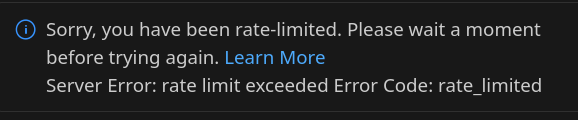
Ok, stopped at shovel. I need to check the version subcommand and color flag on earlier migrated ones. But the fact I was able to have copilot update so many of these with the prompt file is awesome!
Prompt ( /home/bbkane/.config/Code/User/prompts/update_warg.prompt.md):
---
mode: 'agent'
tools: ['githubRepo', 'codebase']
description: 'Update this repo to latest warg API'
---

Please update all files in this repo using the new warg APIs.

For reference, see #githubRepo bbkane/warg , especially the CHANGELOG.md, README.md files and the files in the examples directory.

If needed, also update the Go version in this project to go 1.24

Make sure to use `section.CommandMap(warg.VersionCommandMap()),` to add a version command and `warg.GlobalFlagMap(warg.ColorFlagMap()),` to add a `--color` flag.
Tue 2025-07-01 Project prompts
Project prompts are stored in in ./github/prompts
Create with > Chat: New Prompt file. Note: if you copy a file instead of using this, Copilot can't fnd the prompt. So always use this.
Run by clicking copilot, switching to agent, typing /filename
Example in acm:
---
mode: edit
tools: ['codebase']
---
Please embed the following YouTub playlists underneath "Courses". On desktop they should be on a grid but on mobile they should be in a list. Please respect the existing color scheme and make sure the page is mobile friendly.
```html
<iframe width="560" height="315" src="https://www.youtube.com/embed/videoseries?si=96xU2QjHec8MFk17&controls=0&list=PLT9WHwcLoiUHgzV4_E5RUVHJGtfNSnV6r" title="YouTube video player" frameborder="0" allow="accelerometer; autoplay; clipboard-write; encrypted-media; gyroscope; picture-in-picture; web-share" referrerpolicy="strict-origin-when-cross-origin" allowfullscreen></iframe>
```I'm running into Agent mode hangs when running terminal command · Issue #254447 · microsoft/vscode
I'm working around it by using a vanilla bash terminal in VS Code instead of my normal customized zsh setup:
"terminal.integrated.defaultProfile.osx": "bash",Thu 2026-01-01 - Trying VS Code here again
Going to do some reading to try to get some customizations into warg/enventory..
Warg:
- Use gopkg.in/yaml.v4
- Use os.Args[1:] instead of os.Args
Enventory
- add enabled to variables and references
- add completions to choices
- Add ability to copy all refs?
576 - Using LLMs at Oxide / RFD / Oxide
- LLMs as readers - ask things about code, docs
- they don't recommend using LLMs to write (and I agree - reviewing is better)
- they have internal specific tips and tricks, but I can't access it..
Using agents in Visual Studio Code - basic overview, nothing new here
Customize chat to your workflow - ok this is nice:
| Use Case | Approach |
|---|---|
| Project-wide coding standards | Custom instructions |
| Language or framework-specific rules | Custom instructions with glob patterns |
| Specialized capabilities that work across tools | Agent Skills |
| Reusable development tasks | Prompt files |
| Use chat for planning or research | Custom agents |
| Define specialized workflows | Custom agents |
| Complex reasoning and analysis | Language models |
| Bring your own model | Language models |
| Integrate external services | MCP and tools |
Let's make some custom instructions to document how to do things in enventory, then a custom agent to plan it, then a cloud agent to add a feature
Use custom instructions in VS Code
Custom instructions vs AGENTS.md? https://code.visualstudio.com/docs/copilot/customization/custom-instructions#_type-of-instructions-files - I don't think there's a lot of difference? Ohh... I think AGENTS.md is useful for CLI tools tool, not just VS Code. So let's start with AGENTS.md?
Things to put in AGENTS.md
- architecture
- how to test
- how to write SQL migrations (where to put, etc)
- back up current enventory.db
Other notes: Writing a good Claude.md | Hacker News
- need about 50 instrutions total , < 300 liens (shorter is better)
- table of contents approach and docs folder
ooh in enventory SQLite's migration difficulties (I want to add a column without default which means I need to create a new table and transfer all views and indexes...) means I probably need to write that out with custom instructions and make a plan JUST for this part.
TODO: try to use sqlite-utils for the migration part. See if it patches up indexes, foreign keys, and views
Sun 2026-02-22 VS Code update notes
https://code.visualstudio.com/updates/v1_109
Can use /plan to plan stuff.
It works with Claude files.
Can interrupt the agent thinking with Steer with message option in tthe chat
renderMermaidDiagram tool
Note: to fix the "vscode language model unavailable", I had to:
- uninstall MSFT intellisense plugins
- Uninstall GH chat plugin
- Sign out of my GH accounts
- re-install
- sign into my GH accounts
- close and re-open VS code
I'm not sure which one of those did the trick
Can create hooks with /hooks - I'd like to use this to talk when it wants me to respond
Can use /init to set up md files
How do I get MCP apps working? They can show UI in the editor
You can now double-click immediately after an opening bracket or immediately before a closing bracket to select all the content inside. This also works for strings - double-click right after an opening quote or right before a closing quote to select the string contents. This provides a quick way to select, copy, or replace the content within brackets or strings without manually positioning your cursor.
Agent customization skill (Experimental)
Setting:
chat.agentCustomizationSkill.enabled
A new agent-customization skill teaches the agent how to help you customize your AI coding experience. When you ask about creating custom agents, instructions, prompts, or skills, the agent automatically loads this skill to provide accurate guidance.
Can look into https://github.com/ShepAlderson/copilot-orchestra for "agent orchestration"
The Problems panel now supports filtering by the source or owner of diagnostics. This is useful when you want to focus on specific types of issues, such as build errors, while temporarily hiding diagnostics from other sources like spell checkers or linters. For example, type
source:tsin the filter box to show only TypeScript diagnostics, or use!source:cSpellto hide all spell checker warnings.
Sat 2026-03-07 VS Code update notes
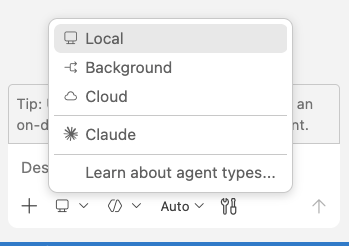
Here's how to find the backgound agent...
https://code.claude.com/docs/en/vs-code#manage-plugins says it can manage plugins but I'm not seeing it.
Agent debug panel:
Open the panel from the Command Palette with Developer: Open Agent Debug Panel, or select the gear icon at the top of the Chat view and choose View Agent Logs.
Agent Plugins: https://code.visualstudio.com/updates/v1_110#_agent-plugins-experimental
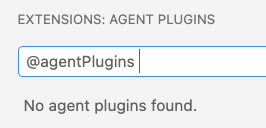
Not seeing any, though it DID autocomplete (maybe because it's experimental)
Agent browser tools: https://code.visualstudio.com/updates/v1_110#_agentic-browser-tools-experimental . TODO: remember this for UIs
/create-prompt: generate a reusable prompt file
/create-instruction: generate an instruction file for project conventions
/create-skill: extract a multi-step workflow into a skill package
/create-agent: create a specialized custom agent persona
/create-hook: create a hook configuration for lifecycle automation
Keybinding to toggle TODO list focus
Use ⇧⌘T to quickly toggle focus between the agent TODO list and the chat input. This is particularly helpful for screen reader users to get an overview of pending tasks and return to the chat inpu
https://code.visualstudio.com/updates/v1_110#_ai-coauthor-attribution-for-commits - Could set this up