CLI Project Notes
Updated Wed 2023-12-27 | 1639 words
- Motivation
- TL;DR I just checked out a repo, what do I do?
- Creating a new project
- Releasing a new version
- Multi-repo maintenance
- Useful Tooling Requirements
- Useful Tooling for all projects
- Useful Go Tooling
Engineering is programming integrated over time - Titus Winters
Motivation
I'm managing enough side projects now that they have "weight" - I'm duplicating and modifying config files for each repo, writing a buncha READMEs, and setting up dependency management. I need to keep my side projects maintainable (over years) and fun during my limited time and energy to hack on them, or I'm going to run out of steam.
In particular, I want the following qualities from my projects:
- A pleasure to use
- good docs/READMEs
- easy installation /uninstallation.
- Minimal runtime dependencies
- Does something I actually care about
- Easy to work on
- Confident refactoring - mostly accomplished with automatic tests. enabled automatic dependency updates
- Similar code / config between projects. Accomplished with linters/formatters and scripted/manual changes
- Quick iteration times!
A lot of the following is directly inspired by Simon Willerson's How I build a feature blog post. That man manages like 100 open source projects, and I've learned a lot from his process. Also see Checklists and Sayings for more exposition on codebases in general, and Go Code Notes for more Go code-focused things.
For an up-to-date example of how I integrate the following code and tools into a project, see example-go-cli.
TL;DR I just checked out a repo, what do I do?
Install linting/testing tools from Homebrew:
brew install golangci-lint yamllint lefthookAdditionally, for Rust projects:
brew install taplo zig
cargo install --locked cargo-zigbuild
Install precommit:
lefthook installRun pre-commit (lints + tests).
lefthook run pre-commit --forceInstall GoReleaser's VS Code plugin.
Creating a new project
Is it necessary?
- Will I use this or will I learn a lot from it?
- Can I use someone else's work instead?
- Is Go/Rust the right language? For small stuff Python works great!
Steps
- Run
new_cli.py --lang go|rustto copy either example-go-cli or example-rust-cli (new_cli.pysource here) - Add feature
- Update
CHANGELOG.md - Update
README.md, particularly with a GIF: makedemo.tapeand updatedemo.gifwith vhs:vhs < ./demo.tape - Make the repo public if possible
- Update bbkane/bbkane.
If the project is Go:
- Update go.bbkane.com to include the new project
go install go.bbkane.com/cli@latestto test (CLIs only)
If the project is a library, not a CLI:
- Delete the
.goreleasor.ymlfile
If a the project is a CLI, not a library:
- Add
KEY_GITHUB_GORELEASER_TO_HOMEBREW_TAPto GitHub repo secrets - the URL ishttps://github.com/bbkane/<name>/settings/secrets/actions - Push a tag to build with
git tagit(see "Releasing a new version" below) brew install bbkane/tap/cli
Releasing a new version
TL;DR: Run
git-tagitin the repo root.
Using git-tagit, releasing a new version of a CLI does the following:
- Updates
Cargo.toml/Cargo.lockand commits (Rust only) - Adds git tag naming the version
vX.X.X- these side projects favor learning over backwards compatibility so this usually meansv0.0.n+1 git push
At this point, CI/CD via GitHub actions takes over:
- Runs tests / lints
- Calls GoReleaser
GoReleaser:
- builds for all architectures I care about
- Cuts a release
- Updates homebrew-tap and scoop-bucket
Finally, users (i.e. me on my other computer) can install using Homebrew or Scoop.
Multi-repo maintenance
Most of the time I'm updating code, not creating new projects, so I'm putting this section before the "creation" notes.
I occasionally need to update something across all the Go projects I maintain. I track most of these in my Go Project Update Tracker Spreadsheet, because the grid format makes it easy to see which changes are applied to which projects.
TODO: 2026-07-10: I should make a Rust Project Update Tracker Spreadsheet as well...
Dependency updates
Once a project has enough tests for my satisfaction, I set up Dependabot to make PRs with dependency updates.
Scripting changes across repos
Some changes can be scripted - especially for config files. I try to keep similar .gitignore, .golangci.yml, .goreleaser.yml files in my projects (among others). I can fairly easily script changes to those with two amazing tools:
git-xargslets you run a shell script against multiple repos and opens GitHub PRs with the results of the shell scriptyqlets you make targeted changes to YAML files. Something like, "change the property at this path to that"
For example, I recently added YAML formatting and linting to all the YAML files I'm using in each repo (sorted keys, comment formatting, etc.).
Another big win is I can keep the change scripts around for inspiration later! I keep all my changes in my git-xargs-tasks and I refer back to previous changes for examples/inspiration when writing new changes.
Manual changes
Some changes are impossible or aren't worth the effort to script across repos. For example: a backwards incompatible library change that requires callers to update. The process I'm trying to stick to for these changes is:
- update Go Project Update Tracker Spreadsheet
- update example-go-cli with the change and test. Update the CHANGELOG.md
- write a detailed issue that describes how to do the change
- add that issue to all repos (perhaps with a label)
- make the change to different projects as I get time/motivation and close the issue. Maybe before I add a feature to a project I close the change issue or before I start another manual change.
Useful Tooling Requirements
I use several tools to keep my code working and maintainable. Requirements for this tooling are:
- Must have:
- Easy installation and updates:
- Preferably packaged in Homebrew for Mac/Linux installation and updates
- A single binary with no runtime dependencies is the easiest to work with
- Preferably wrapped in a fancy GitHub Action
- Easy usage:
- from editor
- from CLI and pre-commit (via lefthook)
- in CI with GitHub Actions
- Easy installation and updates:
- Should have:
- Automatic fixes for any problems found
- Quick runtime
Useful Tooling for all projects
Lint/format TOML with taplo
As of 2026-07-10, I'm quite new to taplo, so while I'm currently only enforcing sorted keys for Rust projects (Go projects don't currently use TOML), I'm sure my usage will grow over time.
MacOS install:
brew install taploRun locally:
taplo fmt --checkAutomatic fix:
taplo fmtLint YAML with yamllint
Most of my configs are YAML, and many of them are very similar from repo to repo. I find it super useful to ensure all my YAML is formatted similarly (in particular I enforce sorted keys) to make diffing the YAML easy.
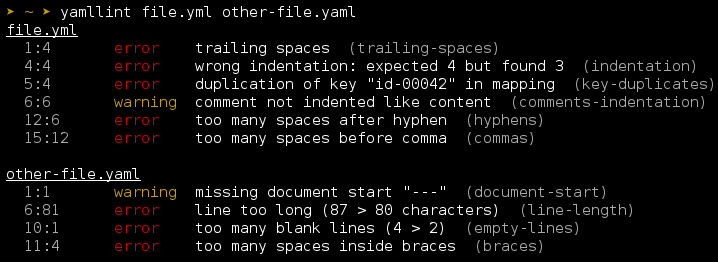
MacOS Install (yamllint is a Python tool, so it does have some dependencies to keep track of):
brew install yamllintRun locally:
yamllint .Automatic fix (mostly for formatting issues):
yq -i -P 'sort_keys(..)' <file>.yamlNo VS Code integration that I'm aware of.
Run CI locally with Lefthook
Install/Run/Uninstall pre-commit hooks that mimic CI. It's much faster to run these locally than to wait the minute or so for GitHub actions to run.
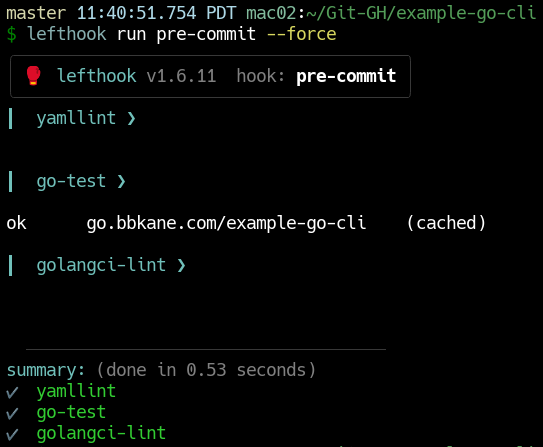
MacOS Install
brew install lefthookRun locally:
- install pre-commit hook:
lefthook install - uninstall pre-commit hook:
lefthook uninstall - Run pre-commit without committing:
lefthook run pre-commit --force
No VS Code integration, but I do set my prompt so it warns me if it's available but not installed:

Script demo GIFs with VHS
Script demo GIF creation! These really make my READMEs pop.
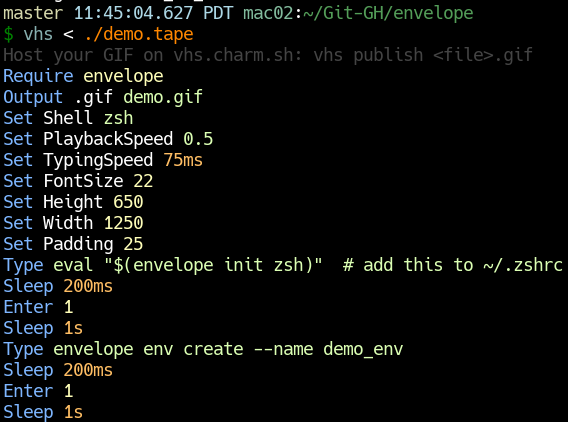
MacOS Install:
brew install vhsRun locally:
vhs < demo.tapeDistribute CLIs with GoReleaser
Build platform-specific executables, upload to GitHub releases, and auto-update both Homebrew taps and Scoop buckets. This is probably the tool that locks me most into Go. It's incredibly smooth to use, especially as a GitHub action when a tag is pushed.
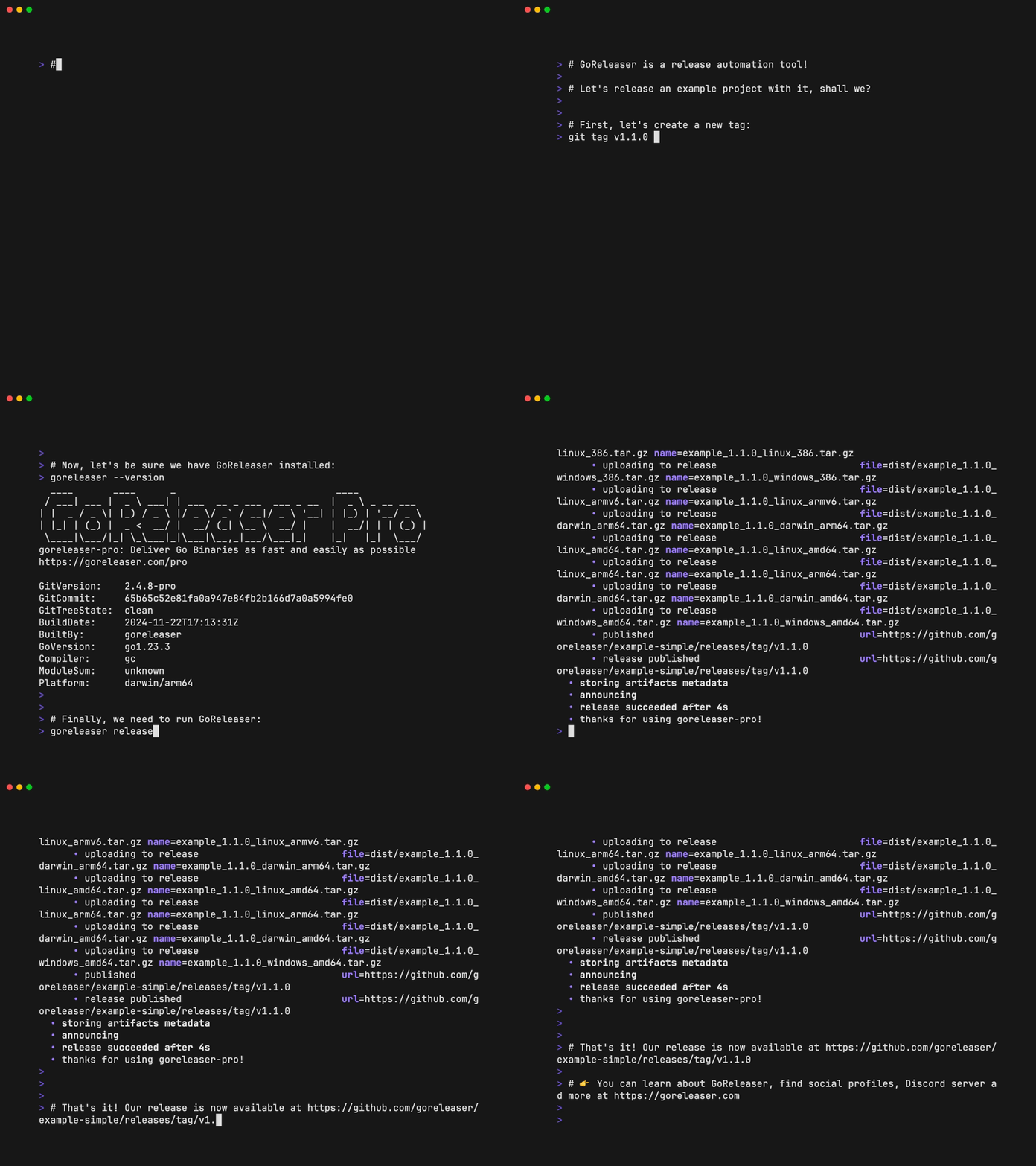
MacOS Install:
brew install goreleaserRun locally:
goreleaser release --snapshot --fail-fast --cleanUseful Go Tooling
Lint Go code with golangci-lint
Run various correctness checks on source code. I love it because it's a binary distribution of a lot of other lints
MacOS Install:
brew install golangci-lintRun locally:
golangci-lint runAutomatic fix:
golangci-lint run --fixVS Code integration is with a plugin .
Note that with the lintTool set to golangci-lint, the Go VS Code extension will go install golangci-lint, despite the fact that this is explicitly recommended against. ¯_(ツ)_/¯
Format go.mod with go-modtool
Organically, my go.mod file seems to end up with multiple random require stanzas... So I found go-modtool, which organizes them much better.
MacOS Install:
go install github.com/shoenig/go-modtool@latestRun locally:
# group stanzas
go-modtool -w fmt go.mod
# sort lines in stanzas
go mod tidy
Slightly unfortunately, it doesn't sort lines in each stanza, so I have to run a go mod tidy to do that. I probably won't put this in CI, and instead just run it occasionally.